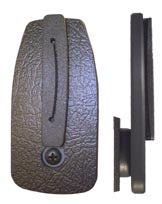
213218 - Monitor mount -Monitor tartó
Szerelőlap csuklóval, középre helyezett forgásponttal.
A terméket a kosárba tettük
Észrevettük, hogy jelenleg nincs a kosárban ehhez a telefontartóhoz tartozó ProClip rögzítő. Szeretne kiválasztani egy ProClip rögzítőt is?
Egy éves garancia
Megosztás

TOVÁBBI INFORMÁCIÓK
Összecsukható tartalom
Beszerelés lépései
|
|
Designed to be mounted with the ProClip mounting platform.
1. Remove the screw so you get two parts, one face plate and one attaching part (the smallest part). Screw the attaching part onto the ProClip by using the enclosed screws.
2. Place the face plate onto the attaching part so the holes in the pivot joint fit. Screw the face plate onto the attaching part. Note that the face plate will be harder/looser to tilt and swivel depending on how tight you screw on the screw.
3. Place the screen onto the screen mount by sliding it downwards from above onto the nut in the center of the face plate. The rubber ring on the metal piece is to be OUTSIDE the groove on the back of the screen. Tighten the wheel on the back of the screen mount so the screen has a firm fit. The screen can be removed and you can take it with you when leaving the car.
4. A screen mount with a screen in place. |
Kompatibilis modellek
- VDO Dayton 5000
- VDO Dayton MM 5500 (7")