


217235 - Mount - Rögzítő
217235 - Mount - Rögzítő
AMPS furatokkal
Normál ár
29.990 Ft
Normál ár
Akciós ár
29.990 Ft
Egységár
/
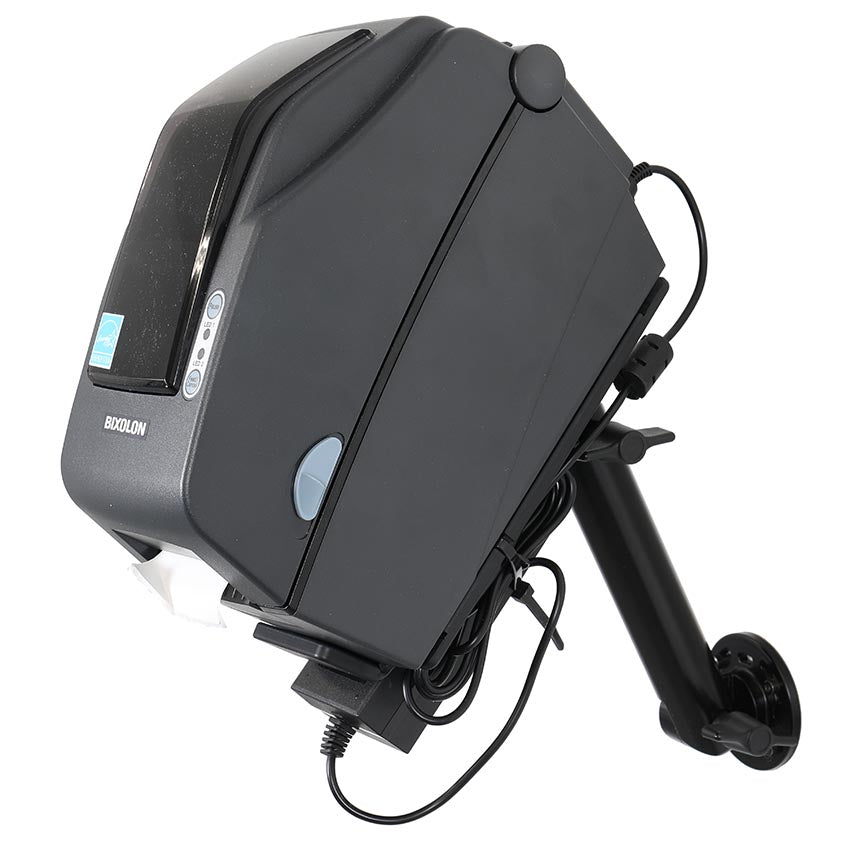
Ez a nyomtató tartó intelligens, stabil és helytakarékos megoldást kínál a nyomtató felszereléséhez. A kialakítás gondosan kidolgozott, hogy ötvözze a funkcionalitást és a kényelmet, így könnyen létrehozható egy rendezettebb és ergonómikusabb munkaterület.
A tartó vastagsága mindössze 7 mm, így a nyomtató a felülethez közel helyezkedik el és minimális helyet foglal – ideális olyan munkahelyekre, ahol minden centiméter számít. A robusztus kialakítás biztosítja, hogy a nyomtató biztonságosan a helyén maradjon. További előnye, hogy a kábeleket rendezett és biztonságos módon rögzíti, csökkentve az összegabalyodás, kopás és véletlen leválás kockázatát, miközben a telepítés professzionálisabb és rendezettebb megjelenést kölcsönöz.
A tartó AMPS furatmintával rendelkezik, ami egyszerű és rugalmas telepítést tesz lehetővé. Gyorsan rögzíthető egy talapzathoz, csőhöz, rúdhoz vagy bármilyen sík felülethez, az Ön igényeitől és munkakörnyezetétől függően.
A kiváló minőségű ABS/acetal műanyagból gyártott tartó kiváló szilárdságot, méretstabilitást és hosszú élettartamot biztosít. Szín: fekete. Gyártási hely: Svédország.
A tartó vastagsága mindössze 7 mm, így a nyomtató a felülethez közel helyezkedik el és minimális helyet foglal – ideális olyan munkahelyekre, ahol minden centiméter számít. A robusztus kialakítás biztosítja, hogy a nyomtató biztonságosan a helyén maradjon. További előnye, hogy a kábeleket rendezett és biztonságos módon rögzíti, csökkentve az összegabalyodás, kopás és véletlen leválás kockázatát, miközben a telepítés professzionálisabb és rendezettebb megjelenést kölcsönöz.
A tartó AMPS furatmintával rendelkezik, ami egyszerű és rugalmas telepítést tesz lehetővé. Gyorsan rögzíthető egy talapzathoz, csőhöz, rúdhoz vagy bármilyen sík felülethez, az Ön igényeitől és munkakörnyezetétől függően.
A kiváló minőségű ABS/acetal műanyagból gyártott tartó kiváló szilárdságot, méretstabilitást és hosszú élettartamot biztosít. Szín: fekete. Gyártási hely: Svédország.
 Egy éves garancia


Beszerelés lépései
Kompatibilis modellek
- Bixolon SLP-DX220